Sometimes, Linux commands can be intimidating due to their numerous options and parameters. Even experienced users occasionally need a quick reference. You could dig through man pages or scour the internet, but what if there were a faster way? Enter cheat.sh, an amazing tool that provides instant access to cheatsheets for any Linux command.
cheat.sh is the massive, crowdsourced collection of cheatsheets that you can pull up instantly. It pulls info from sources like the Cheat project, TLDR pages, StackOverflow, and others, then gives it to you in a clean and easy-to-read format.
The best part? You don’t need to install anything! You can use cheat.sh directly with the curl tool. If you’ve ever downloaded something via the terminal or interacted with web APIs, you’ve likely used curl before. It simply fetches data from URLs. And, cheat.sh leverages this functionality to deliver cheatsheets straight to your screen.
Getting Started With cheat.sh
The basic syntax for working with the cheat.sh is straightforward. For example, if you want to fetch a cheat sheet for a command like tar, you can simply open your terminal and type this:
curl cht.sh/tar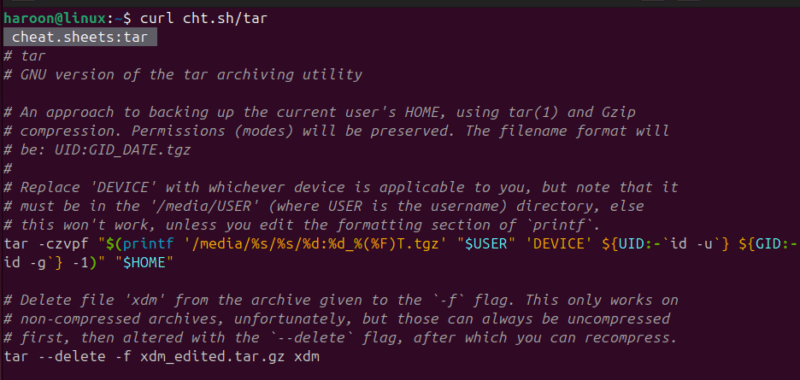
Within a fraction of a second, the tool retrieves a neatly formatted cheatsheet with common options, usage examples, and handy tips.
That’s it! Just replace tar with any command that’s giving you trouble.
For example, to check the syntax for the find command, use:
curl cht.sh/findThis will display details on how to find files by name, type, modification date, size, and even how to execute commands on located files.
Searching with keywords
You can also get a cheatsheet even if you are not sure of the exact command by searching with keywords. Just describe what you want to do using ~. For example, if you want to find and delete files:
curl cht.sh/~find+delete+filesThis searches through the cheatsheets for topics related to finding and deleting, likely pointing you to the find command’s, delete option or ways to use it with xargs.
Not Just Linux Commands – it works for programming languages too. Need a quick reminder on Python list comprehension, run this:
curl cht.sh/python/list+comprehension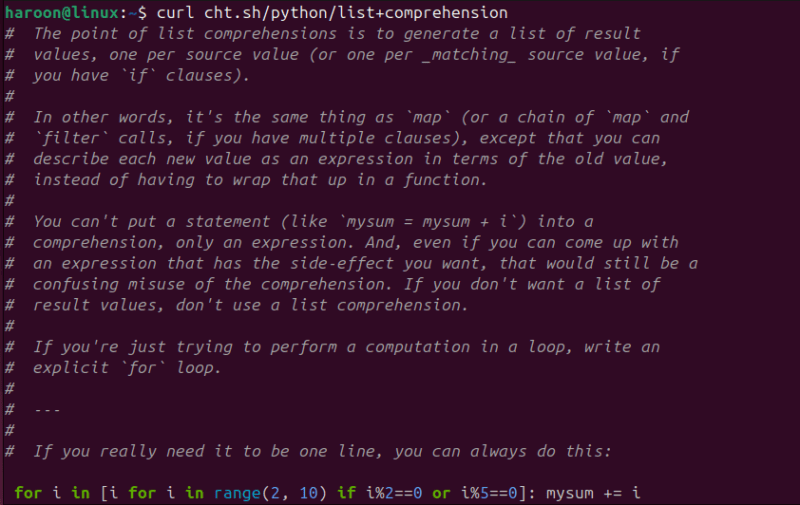
Want to understand Git commands? Use:
curl cheat.sh/git/mergeMaking cheat.sh even more accessible
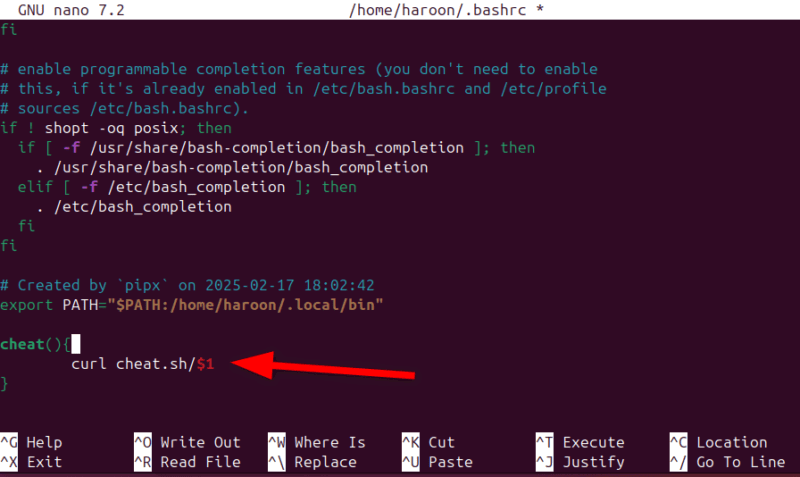
While the curl method works perfectly fine, you might want a more convenient way to access cheat.sh, especially if you use it frequently. You can create a simple shell function or alias in your .bashrc or .zshrc file.
Open your configuration file with any text editor like Nano (For Bash):
nano ~/.bashrcFor Zsh, run:
nano ~/.zshrcPaste the Function:
cheat() {
curl cheat.sh/$1
}
Finally, save and close the file, then reload it with:
source ~/.bashrcNow, with this function defined, you can simply type:
cheat tarThis shorthand saves you a few keystrokes and makes the tool feel more integrated into your workflow.
Try cheat (The Installable Go Version) For More Configuration Options
While cheat.sh is fantastic for quick lookups, some users might prefer more control and customization. That’s where the cheat command-line tool comes in. Instead of making HTTP requests to a remote server, this tool maintains a local collection of cheatsheets that you can customize with personal notes, color themes, and preferred text editors.
Note: The naming can be a bit confusing – cheat.sh and cheat are two different tools. The one we’re discussing here is a sleek, modern tool written in Go that you can download and install.
The easiest way to install the cheat is by using the snap package manager, or, if you have Go set up, you can install it directly with Go.
For example, On Debian/Ubuntu, run:
sudo snap install cheatAlternatively, use Go:
go install github.com/cheat/cheat/cmd/cheat@latestOnce it’s installed, using it feels pretty much the same as the cheat.sh:
cheat <command_name>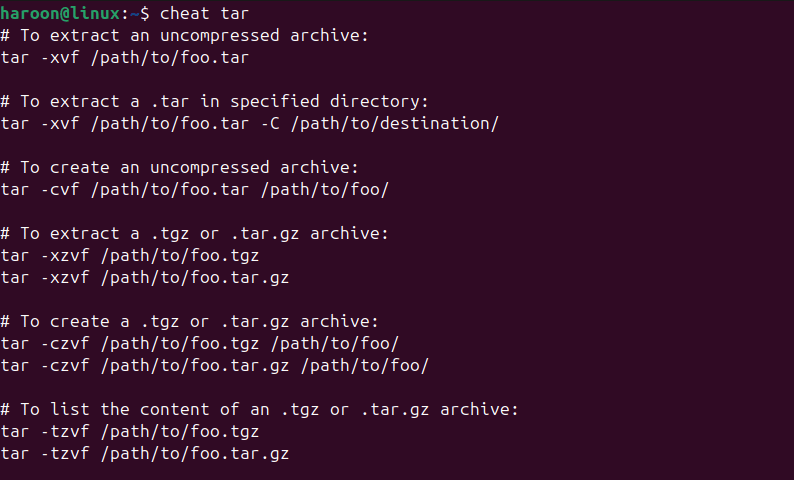
You can also see what sheets you have and list them all out with this:
cheat -lAnother useful feature of this cheat tool is the ability to create custom cheatsheets. Here’s how you can create one:
cheat -e new_commandThis will open your default editor where you can create a new cheatsheet for “new_command”. The format is simple – add a brief description at the top, followed by examples and explanations.
Final Thoughts
So, cheat or cheat.sh? Look, it’s not really a battle. They’re both useful for different reasons. cheat.sh (with curl) offers instant help on any machine with internet and for quick lookups and covers tons of commands and even programming languages.
If both cheat.sh and cheat tool feel like overkill, consider using TLDR. Short for Too Long; Didn’t Read, TLDR provides simplified help pages for common commands. It’s perfect for beginners who want quick answers without diving into complex documentation.