Checking the domain is the go-to tip for spotting phishing attempts, whether it’s email phishing or website phishing. Unfortunately, you can still get tricked by a homograph attack if you solely depend on looking at the domain name. This guide educates you on what a homograph attack is and how to protect yourself.
What Is a Homograph Attack?
A homograph attack is a deceptive technique in which attackers exploit similar-looking characters from different writing systems to impersonate legitimate entities. They can switch with similar-looking characters from other scripts: commonly Cyrillic, Greek, and Armenian scripts.
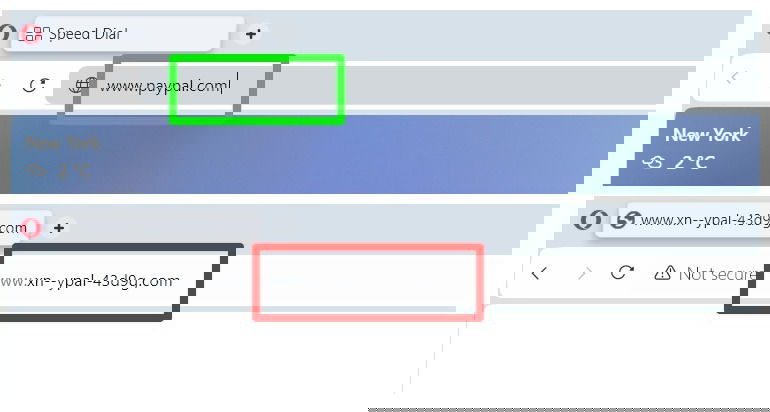
For example, the URL for PayPal in the image below looks the same as the official website, but it doesn’t lead to the real website as it’s written with Cyrillic “p”:
This trick is often used to create fake email addresses and websites for phishing. However, it can also be used to create fake usernames, in-game names, social profiles, file names, and any place where a Latin letter could be substituted with a similar letter from another script for impersonation.
Even if the victim knows about phishing attacks, a homograph attack can still make the user think it’s real and fall for the scam.
Signs of a Homograph Attack
Although homograph attacks can be very deceptive, they often show warning signs that should not be overlooked. If you notice any signs, avoid proceeding with the request and take appropriate security measures:
The Request Includes Something Unexpected or Too Good to Be True
A major red flag in homograph attacks is receiving a message or request that is unexpectedly urgent or too good to be true. These attacks depend on creating a sense of urgency and fear, or offering something enticing so that the victim makes less rational decisions.
For example, you receive an email from PayPal that your account is locked due to suspicious activity, requiring you to log in again from the provided link to verify. Of course, the link would be a phishing site set up to steal your credentials.
Furthermore, it could also be a targeted attack or social engineering attack, where the hacker may email you using your company’s official email to ask you to make a payment to a specific bank account or log in to a page using the company’s account. Or, it could be the opposite, the so-called “too good to be true” offer. The email may ask you to click a link to receive a bonus from your company.
While the request may seem like it’s from an official source, if it’s something you didn’t expect, don’t do anything that may compromise your security. Take the necessary security steps to ensure it’s real before giving any information or clicking any links.
A Warning From Your Browser
Your browser may give a warning if you try to access a homograph webpage or a suspicious page. These browser warnings are almost always correct, especially if they show up on a popular website, like Apple’s home page or Google. Unlike antivirus software, browsers have a much lower chance of false positives due to their limited security scope.
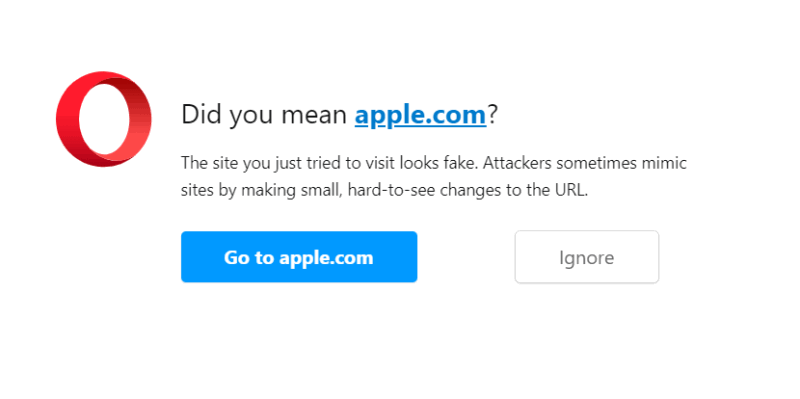
If you receive a warning from your web browser when accessing a website, back out, even if the URL matches the official URL.
Subtle Differences in the URL
Internet Corporation for Assigned Names and Numbers (ICANN) enforces rules for Internationalized Domain Names (IDNs) to minimize the chances of homograph attacks. This means that domain names blatantly designed for a homograph attack could be rejected by some policies. For example, domains with mixed scripts are blocked for most top-level domains (TLDs).
Most homograph attacks will still have minor differences that give away that they are fake. For example, a domain with an accented I ( í ) could be easier to miss, as it’s still Latin, like “wikipedia.com.” Such subtle differences can be hard to see at first glance, so closely look at each letter to see if there are any differences.
You Are Asked to Log in Again When You Are Already Logged In
Another obvious red flag is being asked to log in again when you are already logged in. For most online services, once you’re logged in, your session remains active, even when accessing the site through a different link. If you are asked to log in again, it’s best not to do it through the provided link. Open the login page in a separate tab to see whether you were logged out.
How to Protect Yourself From a Homograph Attack
Whether you have seen one of the signs mentioned above or want to minimize your chances of becoming a target of a homograph attack, there are many ways to protect yourself from homograph attacks. Listed below are the most reliable methods:
Use a Browser That Displays Punycode
Punycode is a way of encoding Unicode characters (like Cyrillic or Greek) into ASCII characters so that they can be used in domain names. Modern browsers automatically identify the use of mixed scripts and show them in Punycode instead of actual characters.
If the domain starts with xn--, with some random numbers and characters, it means the browser has detected the use of different scripts and is now showing Punycode.
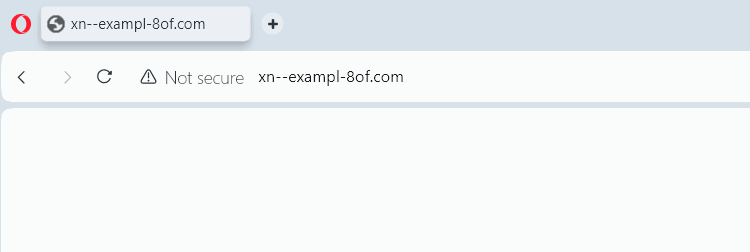
Chrome and Chromium-based browsers like Opera and Edge show Punycode by default; even Firefox has started showing Punycode by default in new versions. Try to use one of these popular browsers to stay secure from homograph attacks.
Use a Browser Extension
While using Chrome or Firefox helps, they still use an algorithm to detect homograph attacks. For example, Chrome only shows Punycode for domains that use mixed scripts – it won’t convert if the full domain uses a single script. To ensure there are no tricks to deceive you, use the PunyCodeChecker extension for either Chrome or Firefox.
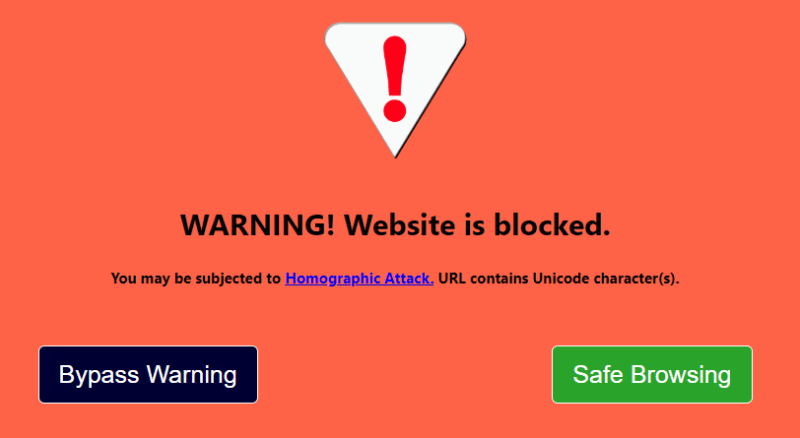
This extension blocks all domains containing non-ASCII characters. If most of the websites you visit are in ASCII characters, this extension will ensure that you never fall for a homograph attack.
Try Entering Fake Credentials on a Suspected Fake Page/Site
If you are already on a page that you think is fake, confirm by entering a fake username and password. Phishing websites usually redirect to a blank page, the real website, or an error page. The real website will probably tell you that your username and password are incorrect.
If the website’s response is different from the standard “incorrect credentials” message, it could mean the site is fake. However, don’t take an incorrect credentials error as a fact that the webpage is legit, as hackers may also set it up to always give a wrong credentials error while still stealing details. Limit this trick to identifying the attacks.
Always Try to Manually Access a Website in a New Tab
Always try to open a website in a new tab instead of accessing it through a given link. It’s the easiest way to avoid homograph attacks, as they heavily depend on clicking the exact link. If the message is real, in most cases, you’ll be able to access it through the secondary tab as well. For example, a security warning will persist even if you access the website in a new tab.
Enable Two-Factor Authentication Whenever Available
Two-factor authentication adds an extra layer of security, ensuring that even if attackers steal your login credentials through a homograph attack, they will still need to pass an additional verification step. Most websites today offer a two-factor authentication method, so make sure you take advantage of it if available.
Use an Online Tool to Detect Homograph Text
If you have suspicions about a URL, email address, username, or any text, use the Punycoder online tool to check whether it uses letters from a different script. You just need to paste the text for it to show Punycode whether it has any non-ASCII characters.
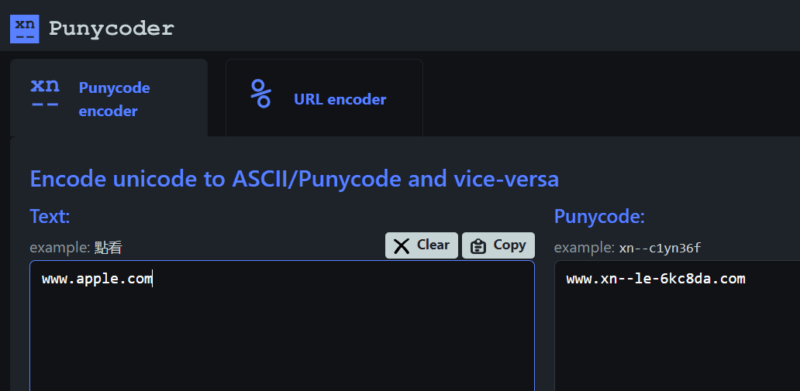
Just paste your text into the box on the left, and it will show Punycode starting with xn-- in the box on the right. It doesn’t matter if the text has mixed scripts or a single script, as it will reveal all.
Use a Password Manager to Autofill Credentials
Using a password manager is another reliable way to protect against any kind of tampering with URLs. Since password managers only enter credentials on the login page of the official website, they ignore fake websites by default.
We recommend 1Password, as it has a plethora of extra features to make password management a breeze. However, if you want something simpler, Dashlane is a great pick with a nice free version as well.
Homograph attacks are indeed a clever way to impersonate entities. Fortunately, with the right mindset and tools, you can stay safe. If you suspect you’ve been targeted, try these initial steps.
Image credit: Vecteezy. All screenshots by Karrar Haider.