If you’re enjoying Gemini, but want to see what the more complex AI models are capable of, you can try Gemini Advanced for free. Google wants to boost signups and if you act quickly, you can bypass the $20 per month fee for a limited time.
1. One Month Free Trial for All Users
The most straightforward way to try out Gemini Advanced free is by signing up for a 30-day trial of a Google One AI Premium plan. You’ll have to provide a credit card to sign up and you’ll want to mark the cancel date on your calendar so you don’t get charged when the month is up.
Open the Gemini app on your device, tap your profile icon in the top right, and select Try Gemini Advanced. Tap Start Trial at the bottom and enter your details to start your trial.
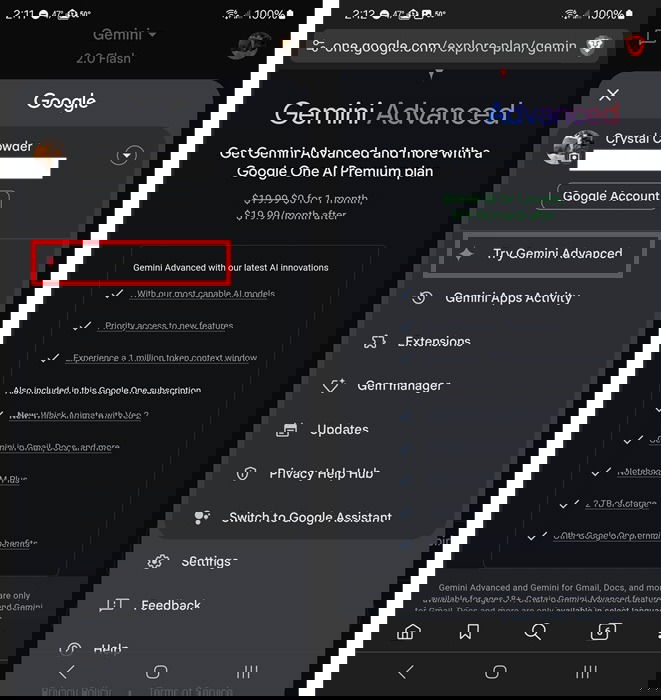
I personally have only had the offer for a one month trial, but some users have received offers for 2-3 months for free. Offers for extra months typically appear around the time Google releases a new AI model.
2. Sign Up With An .EDU Email
If you’re a student or have an active .edu email address, Google’s offering a full year of Gemini Advanced free, along with 2TB of free storage. In a move to attract students, teachers, and anyone else with a valid school email address, Google announced a limited time offer that ends on June 30, 2025. If you sign up now, you’ll retain access through most of the next school year.
Visit Google’s Gemini Advanced site for students to view all the terms and sign up. In addition to Gemini, you’ll also get access to:
- Whisk – Helps with image and video generation
- NotebookLM Plus – A more advanced version of the basic NotebookLM, which is ideal for summarizing documents and aiding in studying
- Canvas – Help craft better research papers, essays, and more
Of course, the most helpful features for students are the study and research tools. Instead of having to spend hours highlighting and pulling notes from various sources, Gemini Advanced’s Deep Research feature guides students to the best possible sources. Then, use NotebookLM Plus to summarize and create study guides.
You can even use Gemini to help you better understand tricky concepts. Need help solving complex math equations? Ask Gemini Advanced to show you step-by-step along with detailed explanations. Don’t want your term paper to be a flop over some simple grammatical mistakes? Gemini Advanced not only checks for errors, but aids you in creating a better flow, organizing your thoughts, and finding even better sources.
To get the most out of your free year, I highly suggest learning how to craft great AI prompts. Of course, if you don’t want to keep Gemini Advanced after your free year, you do have other AI options.
3. Buy a New Pixel Device
If you’re in the market for a new Google Pixel device, buy it before November 2025. Why? You’ll get a Gemini Advanced free for one year. That’s a $240 value to enjoy with your new Pixel. You must buy a Pixel 9 Pro or Pixel 9 Pro Fold2 to qualify.
If you return your device within the trial, your trial cancels immediately and you’ll get charged if you continue using the service.
4. Enjoy Limited Access to Advanced Features
As a way to tempt free users to sign up for Gemini Advanced, Google offers limited access to Advanced features. Unless you’re a heavy AI user, you may find this is all you really need without having to spend $20/month for the premium plan.
A few of the premium features I use for free include:
- Gemini 2.5 Flash and 2.5 Pro – There are limits and queries are processed slower. You get 10 queries per day using these models. Just open the Gemini app and switch to one of these Advanced models using the drop-down menu at the top.
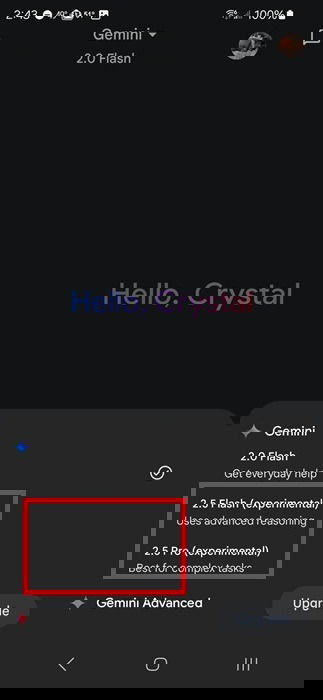
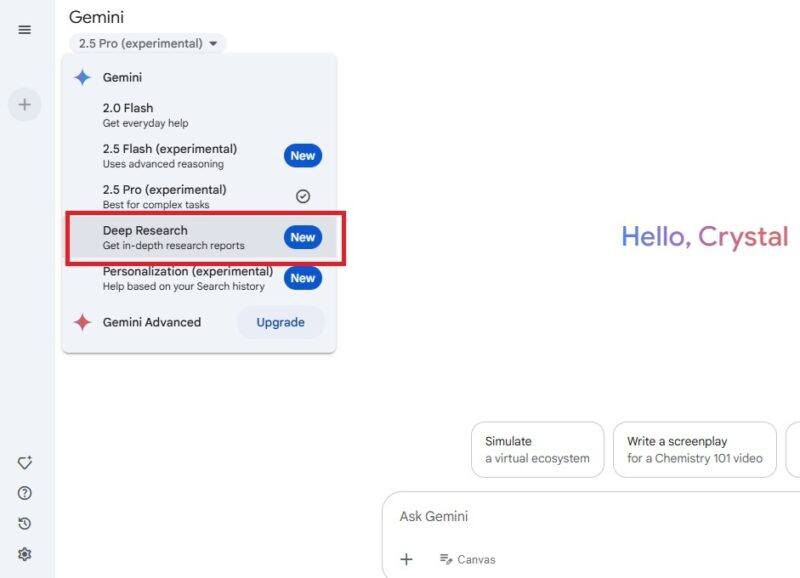
- Deep Research – This is great for summarizing large documents and getting more detailed responses. This one is a bit ambiguous as Google hasn’t specified the exact limits, but one month I was cut off after five queries and the next, I used eight with no issues. I can’t access Deep Research in the mobile app at the time of writing, but it is available on the web version. Select Deep Research from the drop-down menu at the top to access it.
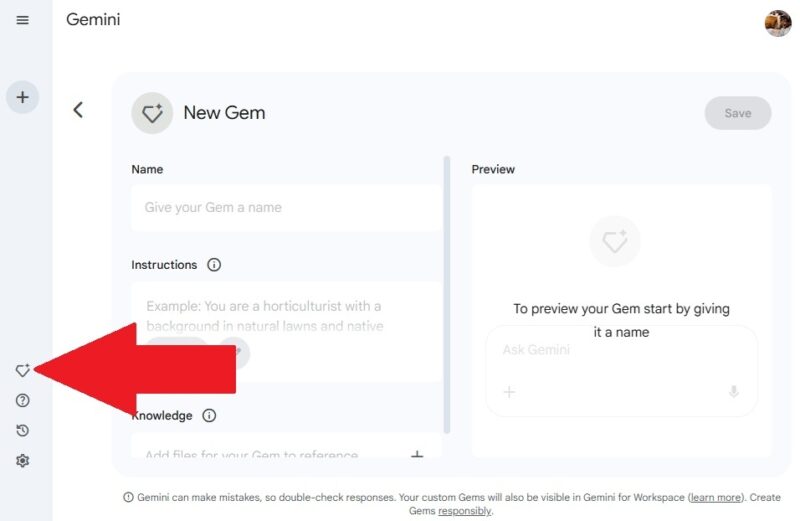
- Create custom Gems – Gems are chatbots catered to specific tasks. This is only available in the web version. You can access five pre-made options in the mobile app. Advanced users can create more complex Gems with more rules, but free users get to create basic Gems without having to upgrade. In my experience, this limited version works quite well. Click the Gem Manager icon near the bottom of the left pane in the web version of Gemini. Click New Gem to start creating your own.
If you’re patient, many Gemini Advanced features come to the free version of Gemini in at least a limited capacity, letting you try them out before committing to a monthly fee. If you want to do even more with Gemini, try out these extensions for free.