Discord is amazing for gaming, chatting, and community building, but most of the best Discord features go under the radar. Since you likely stick to these basics, you miss out on handy tricks that make the app better, which are hiding in plain sight. Whether you’re running a big server or just chilling with friends, these lesser-known Discord features are worth trying to level up your experience. Let’s jump into the good stuff, no fluff.
1. Make Your Own Chat Shortcuts
Ever wish you could customize your chat shortcuts with slash commands and have Discord do all the work for you? You can!
Go to Server Settings, click Integrations, and create your slash commands. You don’t need to code or have a bot; it’s just a simple setup. Also, you can use the built-in slash commands by pressing the / key.
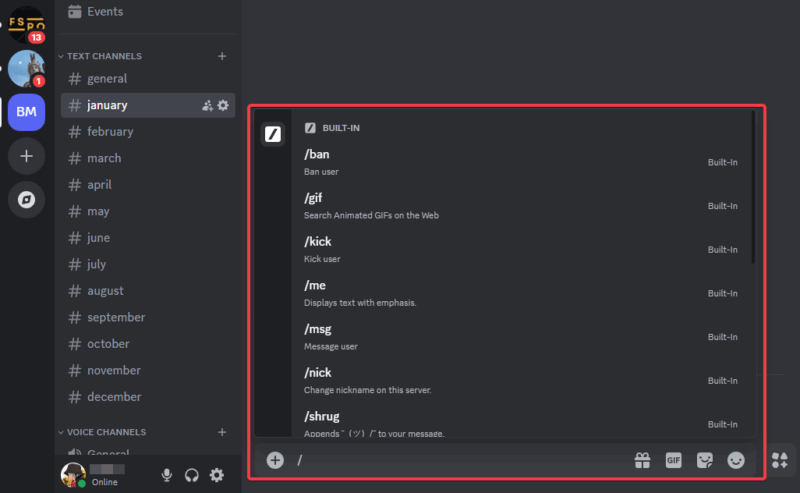
You can try /hello to greet your friends, /roll for a dice roll if you’re into tabletop games, or /wave to gesture a hand wave to your crew. This simple Discord feature is fun and adds personality to your chats.
2. Start Side Chats
Busy servers get wild and messy fast – someone’s yelling about beer while you’re planning a raid. Threads are your fix to keep things tidy.
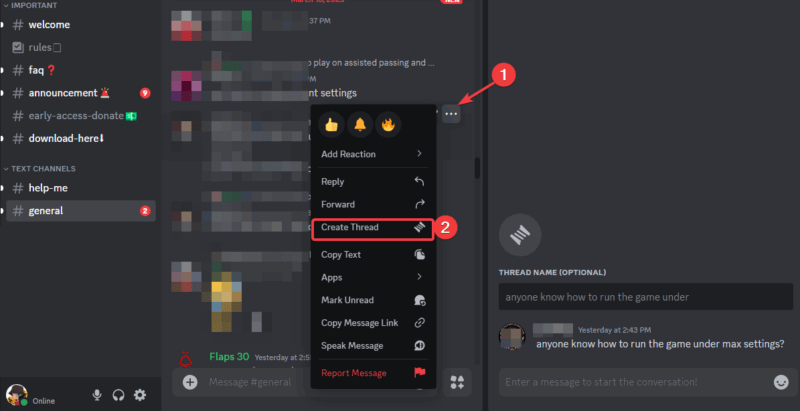
Right-click any message, hit the three dots -> Create Thread, and you’ve got a side chat. This is perfect to take away random conversation or game strategies without clogging the main channel.
It keeps things tidy. This is, hands down, one of the best Discord features for staying organized.
3. Plan Group Hangouts
Tired of typing “let’s meet at 8” and hoping everyone sees it? Scrap that and use Discord’s built-in scheduler.
Use the server dropdown, select Create Event, and set a date, time, and type (voice, stage, or even outside links). After this, your crew will be notified.
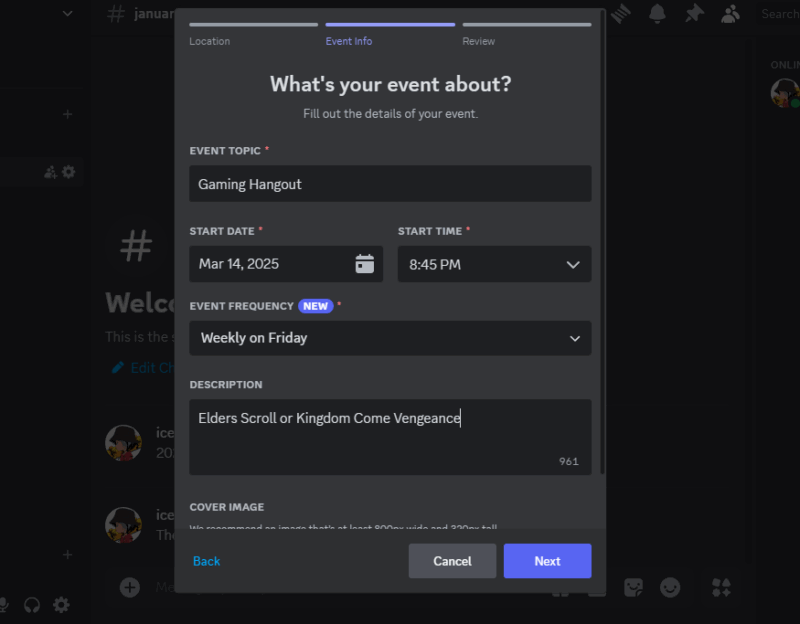
Planning a game night or movie stream? Hop on this Discord feature and stop your reminder spamming. In addition, you can pair this with the Discord Go Live feature for a smooth watch party.
4. Quiet Down Loud Servers
We’ve all joined a server that pings @everyone like it’s their job, and this can be annoying, especially if the information is subpar. Hence, you can shut down that noise without stress.
Navigate to User Settings -> Notifications and toggle on Suppress @everyone and @here for that server.
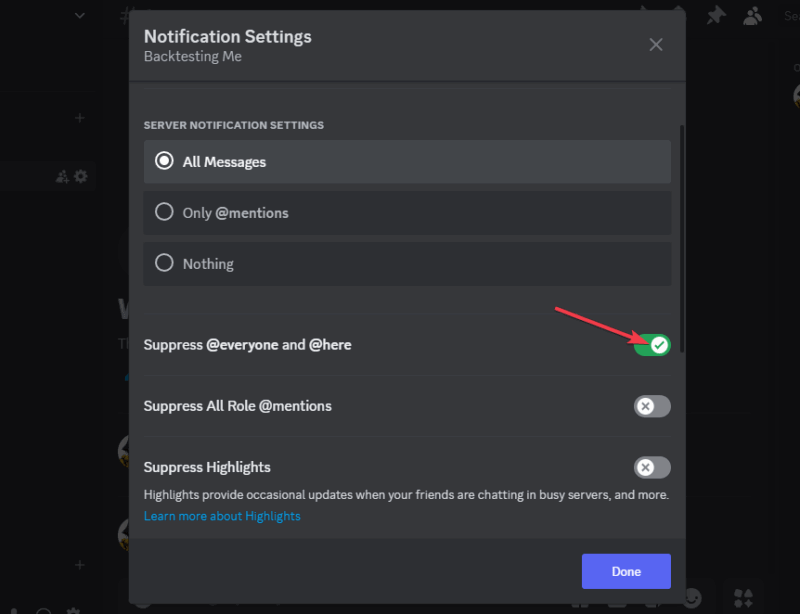
This is a lifesaver when you’re in dozens of groups but are only active in a few. One of the best Discord features for less distractions and peace.
5. Hide Secret Messages
How about dropping a surprise without ruining it? Use spoiler tags in Discord. Just add || before and after your text, like ||birthday party at 8||. This will hide the message until someone clicks it.
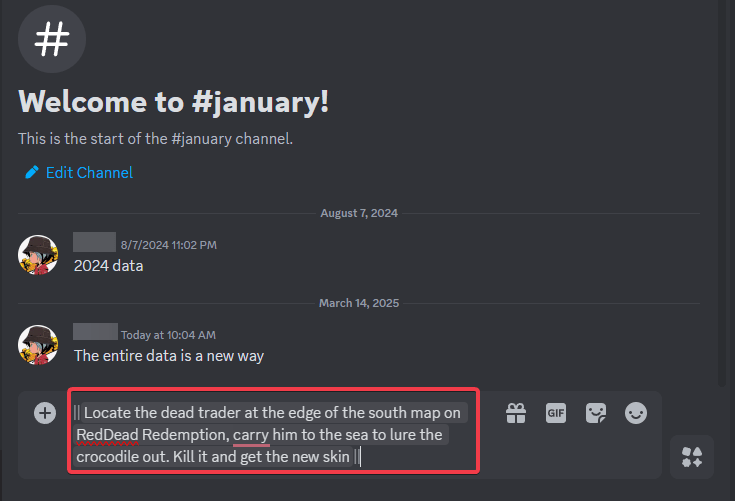
Gamers can tease quest hints or sneaky plans, or you can play coy with birthday plans. This is a fun way to explore one of the best Discord features and add a little mystery to your chats.
6. Edit Fast With the Up Arrow
How many times have you had to delete your entire message just to get to that typo? Well, say no more!
When next you mess up a message, simply hit the up arrow on your keyboard for a quick fix. It pulls up the last text, and you can correct that “teh” to “the” without breaking a sweat.
Stop fumbling with the menus and use this shortcut to save time. A slick hidden Discord feature for quick edits.
7. Mark Chats Unread
Ever try to revisit a message you scrolled past for some information but can’t seem to locate it? You can use this Discord feature for that.
Whenever you come across a message you’ll need to revisit, simply right-click it and click Mark Unread. This will make the message glow in your sidebar like a little reminder.
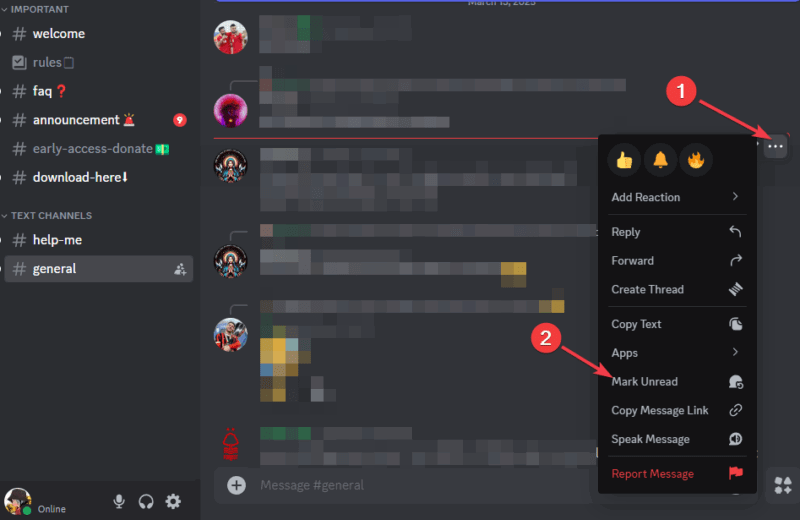
One of the best Discord features for flagging friend’s invite or rule update you’ll need to deal with later.
8. Hide Muted Channels
If you’re a server moderator or creator, you can mute chaotic channels. However, do you know you can take it a step further and hide the muted channels?
After muting, go to the server menu, click Hide Muted Channels, and poof – it’s gone from your list. This is to ensure your sidebar stays clean and clutter-free.
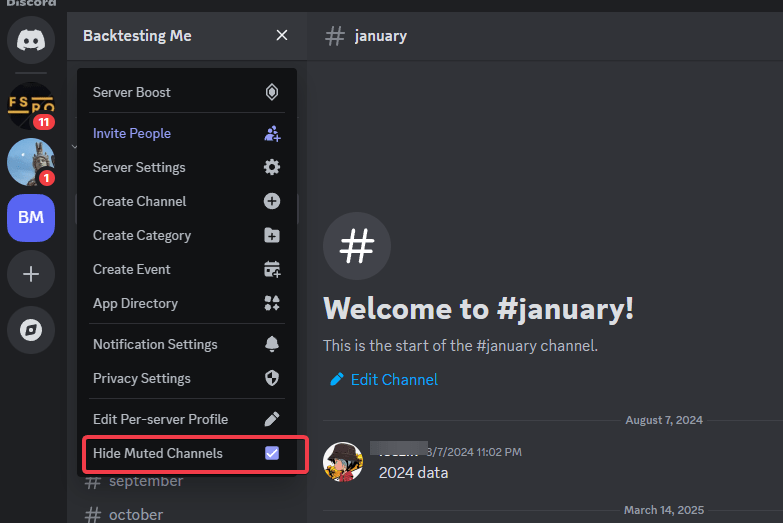
Meanwhile, you can learn how to set up a Discord server for more control tips if you’re just starting out.
9. Calm the Chaos
GIFs and animations can easily turn a chill chat into a flashing mess. If it’s too much for you, head to User Settings, navigate Accessibility, and turn off Play Animated Emojis or Autoplay GIFs.
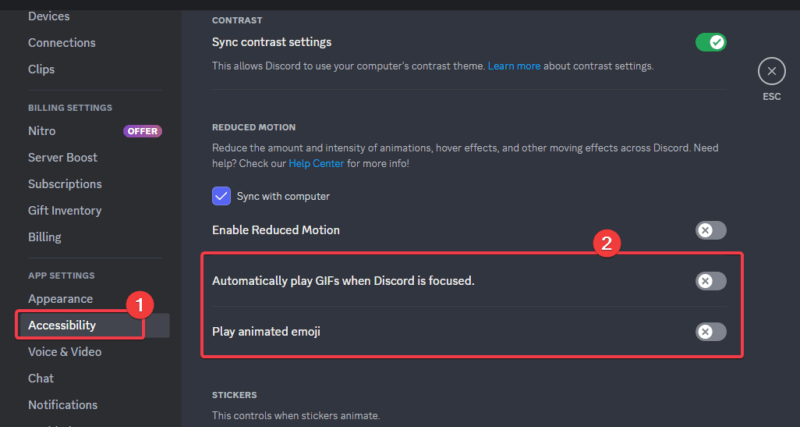
Although they will still work if you click them, the autoplay chaos and spam stop. It’s a chill Discord tweak to reduce hyperactivity and have a calmer chat.
10. Show Off Your Game
Playing something cool and want to let Discord flex it for you? Go to User Settings -> Activity Settings and enable Share your detected activities with others.
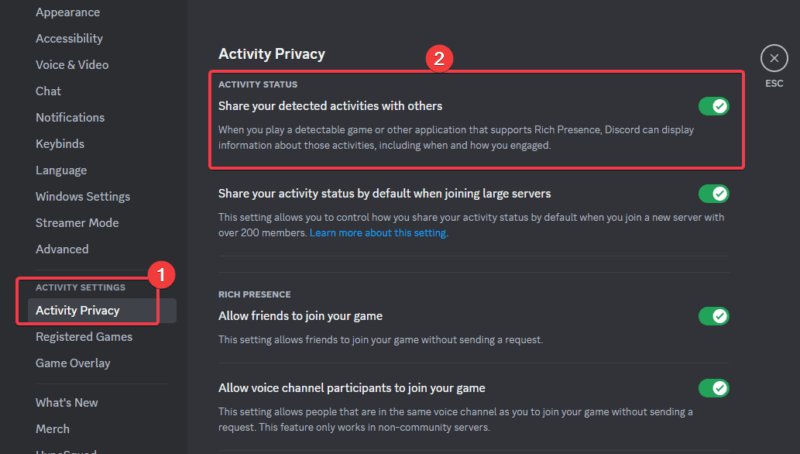
Your status will show what you’re playing automatically, with no manual updates required. It’s a low-key conversation starter and status boost. Should you want to automate more cool stuff to flex, try to make a Discord bot.
So there you have it – these hidden gems are some of the best Discord features that could level up how you use the app. They are all free, built-in, and ready to go. Test them out, and you’ll see why they’re worth it. Got your own favorite Discord hacks? Share them in the comments. I’m all ears!
Image credit: Unsplash and all screenshots by Henderson Jayden Harper