Adding an “About” section and listing skills is just the start – your LinkedIn profile requires deeper optimization to attract top-tier job opportunities. If you want to stand out from the crowd, this guide provides proven methods to optimize your LinkedIn profile for better job prospects.
Add a Keyword-Rich Headline That Solves a Problem
You can only add a 220-character headline on your LinkedIn profile, so don’t waste it listing your skill sets or different job titles. This space is critical because your headline appears directly below your name and photo. Furthermore, the search algorithm heavily leverages the headline content to rank your profile.
You need to add a headline that is catchy by answering what the recruiter is looking for, and it must have industry-related keywords. For best results, divide the headline into the following sections:
- Job title – the exact title the recruiters would search for.
- The problem you solve — list what you deliver, as that’s what recruiters want to see.
- Result – the results the recruiters expect.
- Any credibility marker (optional) – any way to add credibility to your claims, like past expertise or certification.
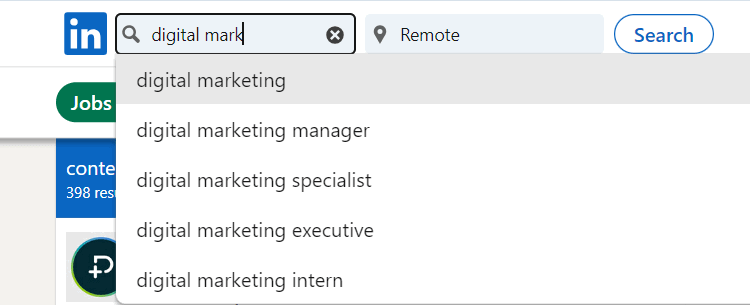
For example, if you are a software engineer, you can craft a headline like, “Senior Full-Stack Engineer | Building Scalable Fintech Apps with React & Node.js | 5x Faster API Performance | AWS Certified.” To find job-related keywords, search for your job title in the LinkedIn search bar and see the autofill results.
Limit keywords to 1-2 per section. Don’t overdo it, as it looks spammy, and some recruiters will skip headlines that are too long without adding value.
Turn the “Featured” Section into a Visual Portfolio
Once a recruiter clicks on your profile, use the Featured section to showcase your work visually. While the About section description is important to explain what you offer, the Featured section does a much better job of proving your expertise visually.
You can add your LinkedIn posts, web links, and media. Whether the work you have highlighted is offline or online, you can feature it. Add videos of your work, live projects, certificates, video testimonials, and anything that can give credibility to your skills.
Even as a starter, you can create a mock sample of your work and upload it here to showcase. Try to prioritize visual content like videos and project demos, and only add text-based content when necessary — such as a writer adding blog articles.
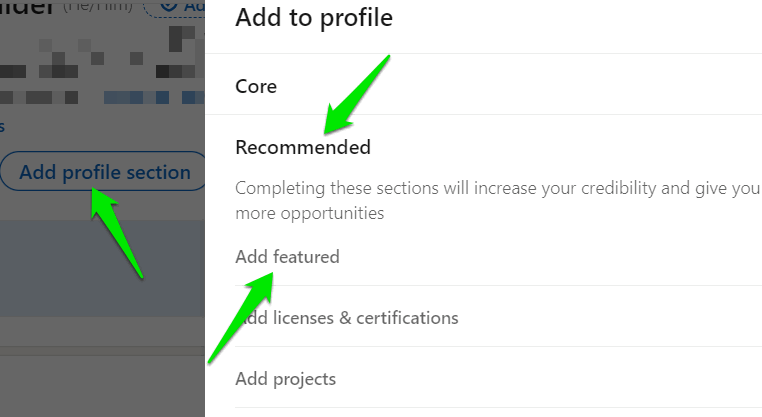
To add a featured section, click on the Add profile section button under your profile headline and select Recommended -> Add featured. If a Featured section is already added, click on the Plus (+) icon at the top of the section.
Prioritize Only the Top 3 to 5 Skills
Recruiters want specialists who can solve specific problems, not generalists. If you list every skill you ever touched, your profile’s focus will become diluted. Recruiters will not be able to pinpoint whether you are a specialist at the task or not, and your profile will get thinly scattered in the search results, making it harder for your top skills to rank.
To set the top skills, first note down your current skills with the most proficient ones at the top, then go to the LinkedIn Jobs section, search for your job field, and look at the top five to 10 job listings. Look at the Skills or Qualifications sections of the listings to see which skills are repeatedly needed that are also in your skills list.
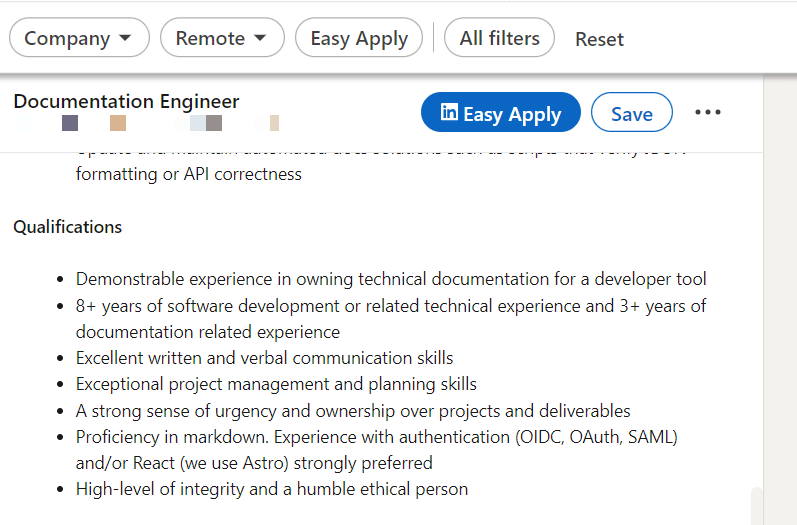
Pick three to five skills that are your best and in demand as well. For example, a software engineer looking for a senior backend engineer position at a fintech company could have the following skills list:
- Python
- Amazon Web Services
- RESTful API Development
- PostgreSQL
- Blockchain Integration
Use the Appropriate “Open to Work” Visibility Setting
LinkedIn offers two visibility options for the Open to work feature: Recruiters only and All LinkedIn members. While it may seem like an easy choice to pick all LinkedIn members when you are looking for a job opportunity, the best choice depends on your situation.
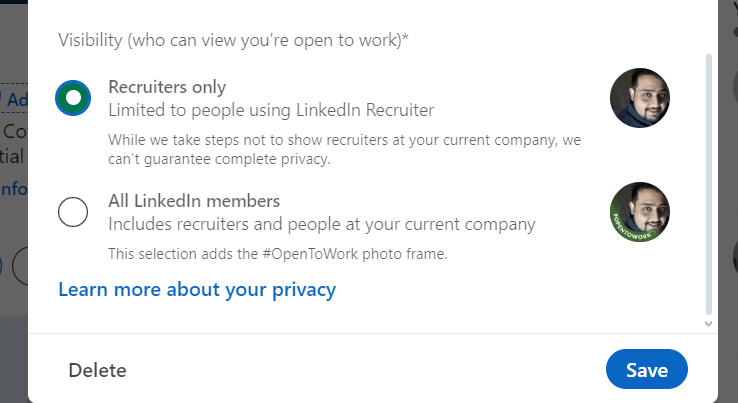
All LinkedIn members
This option will add a green ”#opentowork” banner on your profile picture; everyone will see that you are available for work. The LinkedIn algorithms will also try to bring your profile in front of recruiters, starting with your first connections.
While it offers the most coverage, it also lets everyone see that you are looking for a job, including your current employer and colleagues. Furthermore, it exposes you to MLM schemes, lowball contract offers, and LinkedIn scams.
Recruiters only
With this option, your profile will only be visible to companies that use the LinkedIn Recruiter tool. It’s an enterprise tool made for medium-to-large companies to recruit top talent. Your profile will mainly come in front of big companies offering great job opportunities.
If you think you have sufficient experience in the field and a powerful portfolio to back it up, you should choose this option to have a chance at the best companies. Of course, this also means very limited reach and high competition for the top spots.
Showcase Relevant Certificates
LinkedIn has a dedicated certificates section to showcase your skills and signal proactive learning. This section is not only for showing your expertise to visitors, it also boosts your profile ranking, as it adds more keywords that recruiters would include in their search.
If you have earned any certificates related to your field, list them here. Even if it isn’t an online certificate, you can still enter its details and upload the photo/document. Click on the Add profile section, and go to Recommended -> Add licenses & certifications to add certificates.
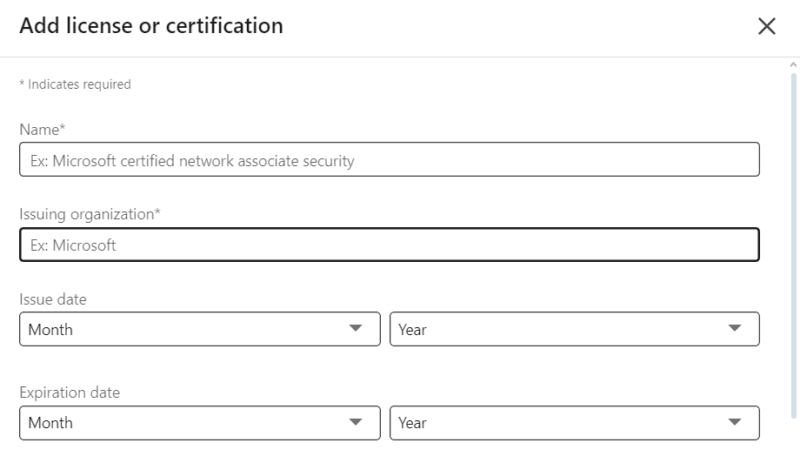
If you don’t have a certificate, you can still earn one for your relevant skills online. There are many learning programs that offer free or very low-cost certificates for different fields. HubSpot Academy, Google Certifications, LinkedIn Learning, and Coursera are some common platforms that train and provide certificates.
Use a Third-Party Tool to Optimize Your LinkedIn Profile
Knowing what you are lacking in your profile is a great way to optimize what’s missing. While LinkedIn rates your profile, the rating is heavily influenced by the profile’s completeness, rather than how impactful it is. A third-party profile analyzer tool can help with this.
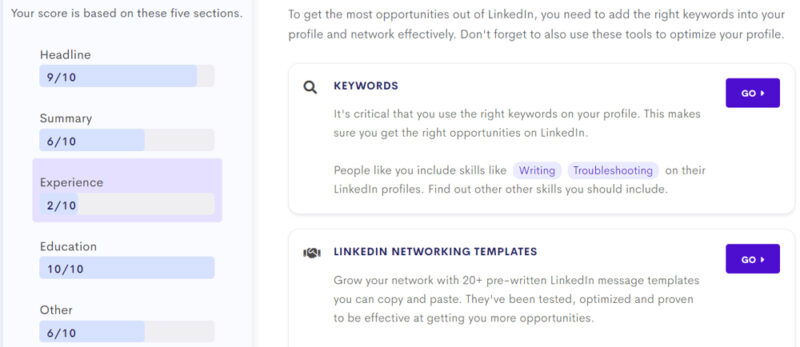
Listed below are the most reliable tools that can analyze your LinkedIn profile and recommend steps to further optimize it, going beyond just completing it.
Résumé Worded LinkedIn Review: using your profile PDF, it gives an overall score to different sections of your profile and helps you use the right keywords for your field.
Redact AI LinkedIn Profile Review: provide your LinkedIn profile URL, and this tool will give an AI-generated review of what could be optimized and what to add.
Jobscan LinkedIn Optimization Tool: helps you compare your current keywords to those sought by employers. You can also compare your profile with related job listings.
As you further optimize your LinkedIn profile, don’t forget to stay active and engage with your network to keep your profile visible in recruiter searches. If you are having trouble finding good job prospects on LinkedIn, learn how to use Google to look for jobs.
Image credit: Pexels. All screenshots by Karrar Haider.