Neptune RAT is among the smartest malware threats targeting Windows devices. It exploits sites like YouTube and Telegram to bypass Windows Defender and other antivirus tools. Its effects include ransomware-locking files, stealing passwords, and erasing the Windows 11 Master Boot Record (MBR). Despite its severity, protecting your Windows device from Neptune RAT is surprisingly easy.
What Makes Neptune RAT So Dangerous
The Neptune RAT malware was first discovered by the security firm Cyfirma. The “RAT” in it stands for Remote Access Trojans. It’s a file that, when opened, lets an attacker control your computer from far away. Usually, Windows blocks these attempts. That’s what antivirus programs are for after all.
However, Neptune RAT is extremely sneaky, hiding its harmful code with Arabic words and emojis, slipping past your firewall, Windows Defender, and other antivirus tools. It even knows if you’re using a virtual machine (VM). At the user end, It invokes two simple PowerShell commands to infect your PC:.
- irm (Invoke-RestMethod): pulls content such as software from websites, like GitHub.
- iex (Invoke-Expression): runs the downloaded stuff as a script program.
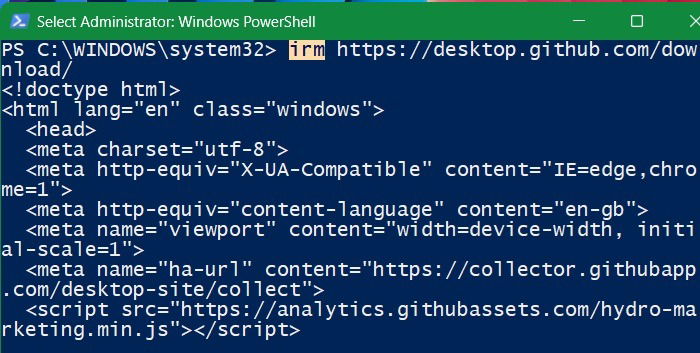
At some point, a batch script lands on your Windows folders. After that, your computer connects to the attacker’s server.
Such a dangerous and persistent malware hasn’t been seen in Windows in a very long time. It uses many DLL files to mess up your system. They can lock your PC data (ransomware), steal passwords from over 270 programs like Chrome and Brave browsers, grab whatever you copy and paste, change your registry settings, and even wipe out your Master Boot Record (MBR).
The worst part? Neptune RAT is currently spreading through social media: YouTube, GitHub, Telegram, and other links. Most people inherently trust YouTube, and for the first time ever, that trust has been breached. It is very easy now for hackers to post a video saying, “Click the link below video description to receive $500 cash,” and then provide a Neptune RAT executable which can be disguised in plain text.
Solutions to Neptune RAT Malware
The dangers of Neptune RAT are many. It sneaks past every malware analysis tool, and does not even require any file downloads. Despite the huge vulnerability, the solutions for Windows users are quite simple.
For Windows Users Who Know PowerShell
PowerShell employs a feature called “Constrained Language mode,” which restricts the application to performing only basic tasks. Once instructed, it can no longer access web resources using irm and iex, therefore blocking Neptune RAT.
$ExecutionContext.SessionState.LanguageMode = "ConstrainedLanguage"To force the constrained language setting on all users of your PC, apply the following:
Set-ExecutionPolicy -Scope LocalMachine -ExecutionPolicy Restricted -Force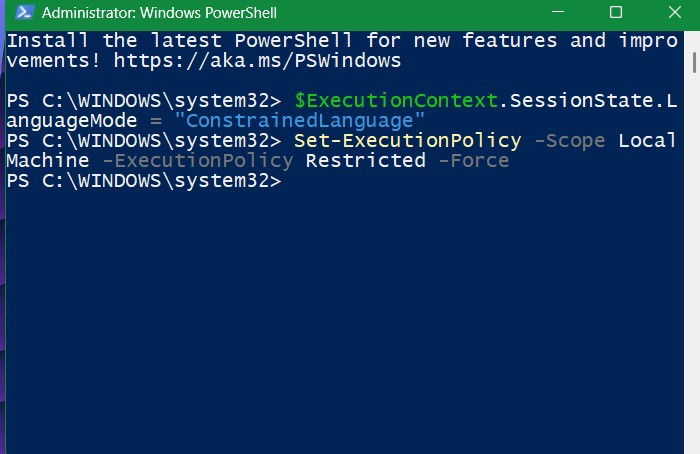
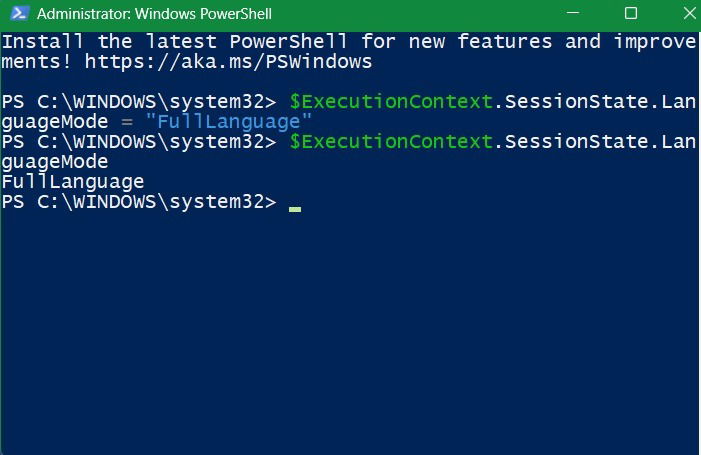
To undo the above setting, just go back to “Full language” mode, and you can start downloading the irm and iex cmdlets again.
$ExecutionContext.SessionState.LanguageMode = "FullLanguage"Till the time Windows release a proper solution, it’s best to keep them disabled.
There is another option. If you don’t really use PowerShell much, you can completely disable PowerShell’s access to the Internet. After this, when you try to run the irm/iex commands, it will generate an error in PowerShell.
New-NetFirewallRule -Name "BlockPowerShellOutbound" -DisplayName "Block PowerShell Outbound" -Enabled True -Direction Outbound -Program "%SystemRoot%\System32\WindowsPowerShell\v1.0\powershell.exe" -Action Block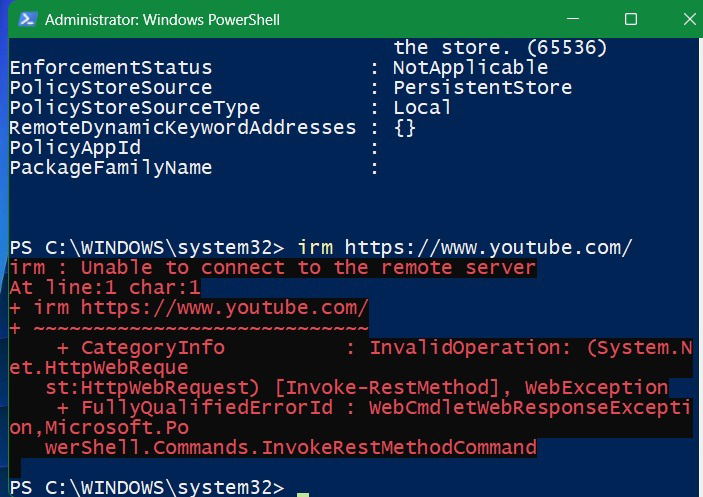
To remove the network level block rule, use the following command:
Remove-NetFirewallRule -Name "BlockPowerShellOutbound"While not being able to use PowerShell for online activity is a minor inconvenience, considering the severity of Neptune RAT threat, I see this as the best solution.
For Non-Techie Users
If you use YouTube or Telegram on a Windows computer, you can stay safe from Neptune RAT by avoiding clicking links in video descriptions – even if the video creators request you to. They might offer discounts or promise to fix security problems. They show up a lot in gaming or ethical hacking videos, but they can also be in movie clips or other topics. You should stop clicking unknown links, even if friends or family share them in social media.
Other recommendations we have for casual Windows users dealing with Neptune RAT:
- Use an authenticator app: on a Windows device, an authenticator app is the best way to protect against intruders trying to access sensitive accounts.
- Use endpoint security solutions: the only way fileless malware like Neptune RAT can be detected is using endpoint security software such as Microsoft Defender, which is different from Windows Security. They do a much better job at responding to suspicious activity in PowerShell.